![City Hive Logo-2.png]](https://support.cityhive.net/hs-fs/hubfs/City%20Hive%20Logo-2.png?width=62&height=60&name=City%20Hive%20Logo-2.png)
Please include the City Hive order number and the Delivery ID so the service team can identify the driver and other key order details. You can find the Delivery ID in the Activity Log at the bottom of the order page.
-
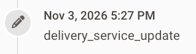
Click the most recent delivery_service update in the Activity Log
-
A pop-up will appear showing the order data and details
-
Scroll down within the pop-up to locate the Delivery ID

Submit a Ticket
Once you have this information, send it over to our team.
-
Click the Need Help icon at the top right

-
At the bottom of the pop-up, select Submit a Ticket

Required Information - Please share as much detail as possible about what happened when the order was handed off to the driver, along with any information from the customer confirming the order wasn’t delivered.
Let us know:
-
Was there an issue with the driver?
-
Were the products not returned to the store?
-
Was there another type of issue that contributed to the delivery problem?
Order Tracking URL
Once a driver has been assigned to the order, you can find the tracking URL in the same delivery_service update pop-up under Presentable Data. This link lets you follow any updates on the delivery in real time.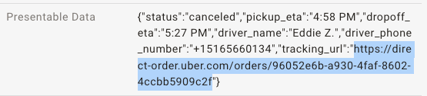
Once we receive this information, we’ll submit it to the delivery service for review. Appeals can take up to two weeks to process, and we’ll keep you updated along the way. If your appeal is approved, the refund will appear on your invoice within 60–90 days of confirmation.