![City Hive Logo-2.png]](https://support.cityhive.net/hs-fs/hubfs/City%20Hive%20Logo-2.png?width=62&height=60&name=City%20Hive%20Logo-2.png)
Each campaign is a ready-made package of professionally designed marketing assets, including emails, push notifications, SMS messages, and website promo banners, distributed strategically across several days.
On promotional campaigns, City Hive subsidizes 50% of the discount cost, so you can drive sales while keeping your margins healthy.
All campaigns follows a simple process:
-
Preview: Upcoming campaigns appear on your calendar well in advance, so you can plan store operations around them.
-
Notification: When a new campaign is ready, you’ll receive a notification 48 hours before launch to review the details and decide whether to participate.
-
Distribution: Once the campaign goes live, marketing messages are sent across multiple channels on scheduled days throughout the campaign.
Once a 1-Click Campaign is approved or automatically launched, it cannot be canceled, paused, or edited midway through its run. Be sure to review all associated marketing sends and dates prior to approving.
How to Manage Campaign Settings
-
Click on the Settings button to customize approvals and channels

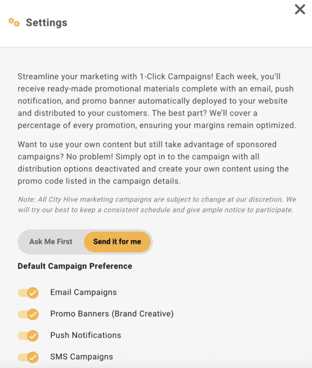
You can choose exactly which channels City Hive uses to send campaigns on your behalf, with an individual toggle for each one. The options include:
-
Email Campaigns
-
Promo Banners (Brand Creative) – coming soon
-
Push Notifications
-
SMS Campaigns
-
- Ask Me First gives you full control over campaign approval by clicking Approve or Decline if you’re in. You’ll receive a notification with a 48-hour window to review the campaign details, messaging, and scheduled dates before making your decision
Ask Me First Users: Because active campaigns cannot be paused or edited once approved, we strongly recommend clicking View to inspect all scheduled sends and designs before approving.
- Send it for me (Recommended) is the fully hands-free option. City Hive automatically enrolls your store in upcoming campaigns, so you never miss an opportunity for customer engagement or subsidized promotions
If you wish to use a sponsored promo code in your own custom marketing materials, opt in to the campaign and toggle off all distribution channels.
Views and Campaign Details
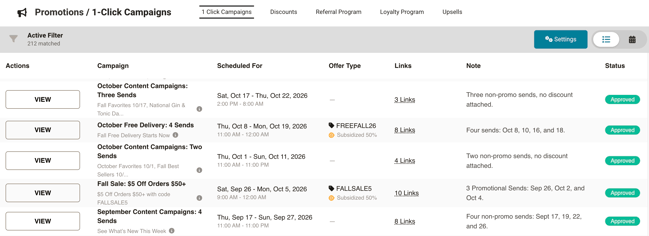
In your dashboard, you can switch between two views in the top-right corner 
List View displays all active, upcoming, and past campaigns alongside key metrics and actions:
-
Click Approve or Decline (for Ask Me First mode) or click View to inspect the full breakdown of individual notifications, messaging, and visual creatives
-
Indicates whether a promo code is attached and displays the Subsidized 50% badge for co-funded promotions
-
Displays the overall date range and run time for the campaign package
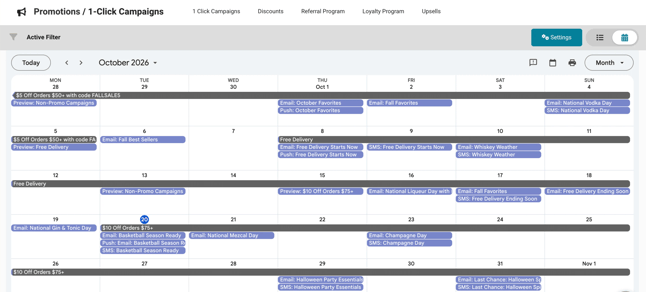
Calendar View provides an interactive visual schedule of your entire marketing calendar:
-
Dark header bars span the full date range of active campaigns (e.g., $5 Off Orders $50+ or Free Delivery).
-
Blue blocks indicate the exact days and times specific channels (Email, Push, SMS) will trigger.
-
Clearly marked preview entries show when upcoming campaigns will become available for review, allowing you to stay ahead of your store's promotional schedule. You can also sync this schedule directly using the Add to Google Calendar link at the bottom of the page.
Campaign Details shows the message, disclaimer, offer code, run dates, and promotional send schedule, along with who approved the campaign and when:
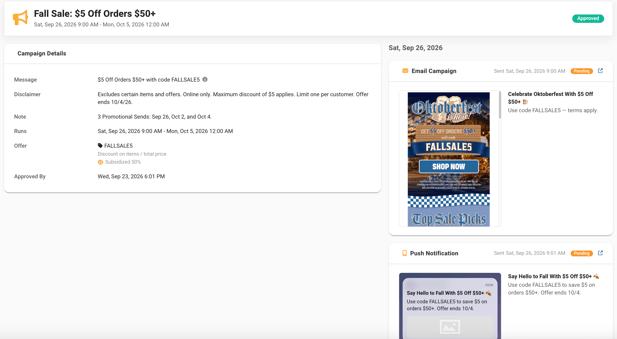
Next to the details, you’ll find a list of every push notification, email, and SMS message scheduled for the campaign, organized by send date, so you can preview exactly what your customers will receive.
Each send displays its channel, scheduled date and time, current status (such as Pending), and a preview of the message. To see a send in full, click the external link icon next to it
Key Benefits
-
Zero Effort Strategy: Gain access to expert-level marketing campaigns without spending hours creating copy, designing graphics, or scheduling sends
-
Subsidized Discount Costs: For promotional campaigns, City Hive covers 50% of the discount cost (e.g., on a 10% discount off a $100 order, City Hive pays $5 and your store pays $5), helping keep your margins optimized
-
Promotional & Evergreen Options: Choose between high-converting discount offers (e.g., $10 Off, Free Delivery) or product-focused evergreen content (e.g., Seasonal Favorites, Staff Picks) that engages customers without offering discounts
-
Custom Execution Flexibility: Prefer to write your own marketing messages? You can still take advantage of sponsored discount codes by opting into a campaign with City Hive’s automated distribution channels deactivated
FAQ
How long do 1-Click Campaigns last, and how many notifications will be sent?
A typical 1-Click Campaign runs over a two-week period, but exact timelines vary depending on the campaign. Instead of a single "one-off" notification, you'll see a coordinated package of multiple sends (such as 3 to 5 separate emails, push notifications, and SMS messages) spaced across strategic days to maximize customer engagement. You can always view the exact message schedule on the calendar.
What is the recommended setting for my store?
We strongly recommend choosing Send it for me as your default campaign preference. This guarantees you won't miss valuable promotional opportunities, keeps you in high-quality seasonal or discount strategies without requiring extra check-ins, and leverages City Hive's co-funded 50% subsidies entirely on autopilot.
What happens if I miss the 48-hour approval window?
If your account is on Ask Me First and you do not review and approve a campaign within its 48-hour preview notification window, you will miss that specific campaign. However, if you're on Send it for me, you will automatically participate in every new campaign without having to keep an eye on approval deadlines.
What if I want to use the sponsored discount but create my own custom content?
No problem! You can easily leverage the subsidized promo code while writing your own messaging. To do this, opt in to the campaign but simply go into your Settings and toggle OFF all default distribution channels (Email, Push, SMS). This disables City Hive’s automated sends, freeing you to create your own materials using the exact promo code listed in the campaign details.
Can I opt out of promotional discounts and only receive non-promotional campaigns?
If you want to opt out of promotional discounts, simply set your preference to Ask Me First so you can Decline discount campaigns while maintaining the freedom to Approve evergreen, non-promotional campaigns (such as holiday showcases and staff favorites) that do not require store discounts.